> For the complete documentation index, see [llms.txt](https://docs.aqua.network/llms.txt). Markdown versions of documentation pages are available by appending `.md` to page URLs; this page is available as [Markdown](https://docs.aqua.network/user-guides/how-to-vote-for-markets-on-aquarius.md).
# Voting for markets
How to find markets, place ICE votes, earn voting rewards, and withdraw votes in the Aquarius voting interface.
This guide walks through voting for markets in the Aquarius interface. For how liquidity voting works under the hood — on-chain claimable balances, eligibility thresholds, and reward caps — see [Aquarius voting](/voting-and-rewards/aquarius-voting.md).
Voting requires [ICE](/aqua-and-ice/ice-tokens-locking-aqua-and-getting-benefits.md): lock AQUA into ICE first, then vote with upvoteICE. Votes can be withdrawn at any time. Delegated dICE votes the same way.
### Search for pairs
Once inside the [voting platform](https://aqua.network/vote), you can start exploring Stellar market pairs. You can use the tabs to view the most popular pairs, top voted pairs, or pairs with voting incentives. To add a pair to your vote, click **Add To Vote**.
You can also use the search bar to find specific pairs, including pairs no one has voted for yet. These will show a **Create Pair** tab next to them. Adding these to your vote will enable others to vote for this pair. Creating pairs requires up to 5 XLM, which gets used to make new voting wallets containing trustlines for the assets in question.
### Selected pairs
As you add and create pairs, they get placed in your voting basket. You can navigate to it anytime by clicking the **Chosen Pairs** bubble in the bottom right corner.
Inside the modal window, adjust the amount of ICE you dedicate to voting, then break down how much to allocate to each pair. When you are done, proceed to submitting the transaction.
### Earning voting rewards
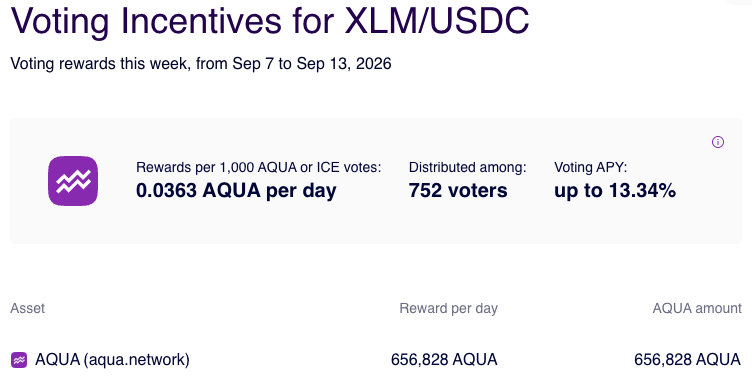
Some markets carry [voting incentives](/for-projects/what-are-voting-incentives.md) — rewards offered to voters of that market, paid out daily. Click a market's voting incentive bubble to see how long the voting incentive is active and which Stellar assets are offered as incentives.
To qualify for a voting incentive distribution, assign votes to the market with voting incentives and add trustlines for its reward assets. Eligibility depends on the daily snapshot and the campaign's distribution conditions. Markets with voting incentives are listed under the **With Voting Incentives** tab; to fund a campaign, see [Creating voting incentives](/user-guides/how-to-create-voting-incentives.md).
### Adding more votes
To add voting power to an existing allocation, select the market's upvote button. The market returns to the voting basket, where you can enter the additional amount.
### Withdrawing votes
To withdraw your votes, go to My Aquarius, open the **My Liquidity Votes** tab and click **Manage unlocked votes**.
In the modal, select the markets you want to withdraw votes from and click **Claim selected** to build the transaction.
### Voting boosts for paired markets
Markets paired with AQUA receive a 50% **voting boost**, and markets paired with USDC or XLM receive 30%. The boosts are cumulative and multiply the market's votes — raising its share of rewards — until the market reaches 10% of adjusted votes.
{% hint style="info" %}
Liquidity providers, not voters, benefit from the boost. See [Deposit & withdraw liquidity](/user-guides/pools/deposit-and-withdraw-liquidity.md) to provide liquidity.
{% endhint %}